For law firms of 5–50 people

Phishing, scams and malware, stopped before they load.

On a Mac, every link, download and connection is checked. On an iPhone or a Windows PC, known bad sites won't open. $97 per person per month.

New Windows 11 PCsWhat each device gets

About a minute per Mac · Month to monthHow exposed is your firm? Take the 2-minute check
Built on Cloudflare's network, which by Cloudflare's own count sits in front of about a fifth of all websites.
330+cities, checks happen nearby
~1 minto install on a Mac
24 hlogs kept, then deleted
0settings for staff on a Mac
How it works

One tunnel. Three checks. Then the internet.

Before a page opens, Walltunnel checks it at the nearest Cloudflare data center. On a Mac it checks three things: the site's name, the connection, and the page or file itself. On an iPhone it checks the name, which catches the most common risk: a click on a known bad link. Each check takes thousandths of a second.

One click, stopped in milliseconds

Here is the click that would have cost the firm.

A paralegal gets an email: "Signed retainer attached." It looks exactly like the real thing. This is what happens next.

9:41

The link is clicked.

Safari asks for docusign‑review‑secure.com. Without Walltunnel, the fake sign-in loads.

+3 ms

The name is checked.

Before Safari even learns the address, the lookup is matched: phishing, registered 48 hours ago.

+12 ms

The page never loads.

A plain page explains what happened. No password typed, no file downloaded.

After

It's on the record.

The block is logged with the device and the time, so it can be looked up later.

What it stops

Stopped at the network, for everyone at once.

Refused before they load

The attacks small firms actually get.

Matched against Cloudflare's threat intelligence, which is updated continuously as new attack domains appear.

  • Phishing and fake sign-in pages
  • Malware and spyware hosts
  • Scam sites
  • Botnet command servers
  • Brand-new and parked domains
  • Cryptomining
  • Apps that hide their own DNS, on Macs
Files

Downloads scanned in flight.

On a Mac, every file is checked for malware before the last byte lands. Very large files are let through unscanned. Installers and scripts from untrusted sites don't arrive at all.

Encryption

Safe on hotel and café Wi‑Fi.

On a Mac, everything is encrypted before it leaves, with encryption built to resist future quantum computers. Case files keep their value for decades; so should their protection. Details for your IT reviewer.

Phones included

The iPhone with the firm's email on it.

Staff read client mail on their phones, where antivirus never reached. On the iPhone, known bad sites won't open. Staff turn it on once in Settings.

Every five minutes

Each Mac proves it's healthy.

A Mac that slips shows up, so it can be fixed before it matters.

Disk encrypted (FileVault)Passing
Firewall onPassing
macOS currentPassing
Stays on

It can't be switched off by accident.

Staff can't turn it off on a Mac, and if the connection drops it comes back on its own. (iPhones are different; see the questions below.)

Pause protectionLocked
Reconnect after a dropAutomatic
Compare

More than DNS filtering.

DNS filtering checks the name of a site and nothing else. A VPN encrypts the pipe and checks nothing. On a Mac, Walltunnel checks every connection three times.

Tailscale and WireGuard connect your devices to each other. Walltunnel checks what they connect to. A firm can use both. vs Tailscale · vs DNS filtering

Walltunnel compared with antivirus, DNS filtering, a WireGuard VPN, and Tailscale
AntivirusDNS filteringWireGuard VPNTailscaleWalltunnel
Refuses phishing and malware sites before they loadsometimesby name onlyNoadd-on, by nameYes
Scans downloads before they reach the diskafterNoNoNoon Macs
Staff can't switch it offvariesvariesNoNoon Macs
Covers staff iPhonesNoYesif switched onif switched onby name
Covers Windows PCsYesYesif switched onif switched onby name · new
Checks the full address, not just the domainsometimesNoNoNoon Macs
Blocks installers and scripts from untrusted sitesvariesNoNoNoon Macs
Can't be dodged by an app with its own DNSNoeasily dodgedNoNoon Macs
Encrypts traffic on hotel and café Wi‑FiNolookups onlyYeswith exit nodeon Macs
Post-quantum encryption, no fallbackNoNoextra key, by handnot by defaulton Macs
One set of rules for every devicevariesYesNoaccess rulesYes
Reaches office machines from anywhereNoNoset up by handYesNo

On each device

What each device gets.

The same firm rules on every device. How much is checked depends on what each system lets Walltunnel do. The Windows app is new; tell us if anything looks wrong.

macOS 26

Macs

  • Every lookup is checked against Cloudflare's threat intelligence.
  • Web requests are opened at Cloudflare and checked in full.
  • Downloads are scanned before they reach the disk; very large files are let through unscanned.
  • Installers and scripts from new, parked or uncategorized sites don't arrive.
  • Other DNS servers and DNS-over-HTTPS services are refused at the network.
  • Everything leaves through one encrypted tunnel (MASQUE over HTTP/3).
  • ML-KEM-768 with P-256, no classical-only fallback.
  • The switch is locked and the Mac can't be signed out of the firm.
  • If the connection drops, it reconnects by itself.
  • The menu-bar app reads the engine's status every few seconds and shows any problem.
  • Each Mac reports FileVault, firewall and macOS version every five minutes.
  • The time, the Mac, the address and the rule that matched, kept for a day.
  • The firm's Gateway rules.

Limits

  • Someone with the Mac's administrator password can still uninstall it.
  • Downloads too large to scan are let through, not blocked.
iPhone and iPad

iPhones

  • Every lookup goes, encrypted, to the firm's filtering.
  • Lookups are encrypted; other traffic isn't.
  • The setting stays in iOS; the app checks it in the background and says when it's off.
  • The app looks up Cloudflare's test sites and checks they're blocked.
  • Lookups are logged with the firm, not the phone.
  • Leaving the firm removes the DNS setting.
  • The same Gateway rules, through the firm's location.

Limits

  • iOS lets anyone switch the DNS setting off in Settings; the app notices and says so.
  • Only site names are checked: no download scanning and no tunnel.

Not on iPhones: full-address checks, download scanning, blocking installers and scripts from unknown sites, stopping apps' own DNS, post-quantum encryption, a locked switch and device health reports (disk encryption, firewall, OS version).

Windows 11 (x64 and ARM64)

Windows PCs New

  • Every lookup goes, encrypted, to the firm's filtering, the same way as on iPhones.
  • Edge, Chrome, Brave and Firefox are set to use Windows' DNS instead of their own; other apps aren't covered.
  • Lookups are encrypted; other traffic isn't.
  • People without administrator rights can't change it; an administrator can.
  • A Windows service puts the settings back within seconds of a change, and covers new Wi‑Fi, docks and USB adapters.
  • The same test as the iPhone, skipping the hosts file; the tray icon shows Protected or Not protected.
  • Lookups are logged with the firm, not the PC; changes and failures go to Windows' Event Log.
  • Uninstall restores every DNS setting and policy exactly as it was.
  • The same Gateway rules, through the firm's location.

Limits

  • Someone with an administrator account can still turn it off or uninstall it.
  • Hotel or café Wi‑Fi with a sign-in page may not work while it's on.
  • Windows 11 only: not Windows 10 or Windows Server.
  • A PC joined to an office domain is refused unless IT sets the office's names up first.

Not on Windows PCs: full-address checks, download scanning, blocking installers and scripts from unknown sites, post-quantum encryption and device health reports (disk encryption, firewall, OS version).

Straight answers

What it isn't.

You should know where the edges are before you buy.

Not antivirus.

It watches the network, not the disk. A file on a USB stick is invisible to it. Pair it with endpoint protection.

Not reading your work.

It sees where connections go and whether files are dangerous. It doesn't keep page contents or keystrokes.

Not hiding you.

It encrypts traffic on hotel Wi‑Fi, but its job is to check connections, not to make you anonymous.

Not for 500 people.

It's built for offices of five to fifty without an IT team. Larger firms need a security team.

Confidentiality

Your clients' business stays yours.

A firm can't put client files through a service it can't explain to a client. Here is exactly what Walltunnel sees and keeps. How it's built →

Log lines, not contents

For each connection: the time, the device (on an iPhone, the firm), the address and which rule matched. Pages and files are checked in memory and not stored by Walltunnel.

Never sold, never handed over

Logs sit in one Cloudflare account run by AAi, used by every Walltunnel firm today. AAi staff can see them; no one else can. A separate account per firm is being considered. Logs are never sold or handed to anyone.

Kept for a day

Activity logs are kept for 24 hours, so there is no long tail of browsing history.

Nothing typed, nothing watched

Walltunnel doesn't record keystrokes, screenshots or passwords. It decides where a connection may go, not what people do there.

Setup

Protected by the end of the afternoon.

No hardware, no IT department, no training day. Most of the work is ours.

  1. 1

    A short email

    How many people, which Macs, PCs and iPhones, and anything the firm must always reach. A few lines is enough.

  2. 2

    We prepare the firm

    Its Mac installer, the join link its staff use on iPhones and Windows PCs, and where to write for help.

  3. 3

    One installer per Mac

    Double-click, enter the Mac password once, and the shield appears. iPhones join with the firm's link or QR code. On a Windows PC, the same link is pasted into Walltunnel.exe.

  4. 4

    Protected, with help on call

    Every Mac, PC and iPhone shows Protected. On day one staff see one new icon in the menu bar; nothing else changes until something dangerous is blocked.

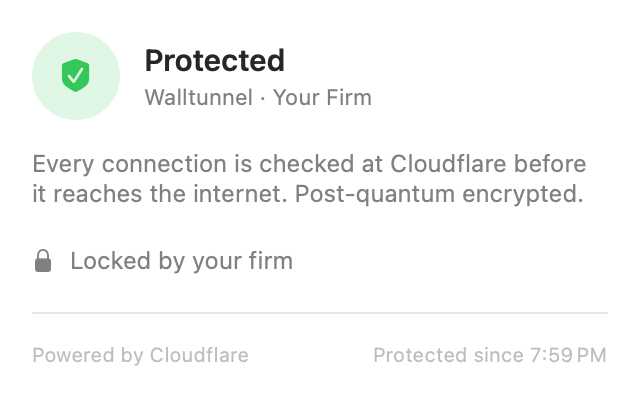
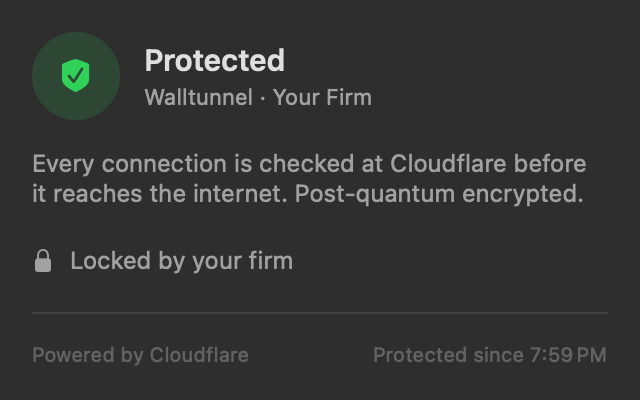
The Walltunnel menu on a Mac: Protected, Walltunnel · Your Firm, every connection checked at Cloudflare before it reaches the internet, post-quantum encrypted, Locked by Your Firm.The Walltunnel menu on a Mac: Protected, Walltunnel · Your Firm, every connection checked at Cloudflare before it reaches the internet, post-quantum encrypted, Locked by Your Firm.
On each Mac One installer. Then a shield in the menu bar that says Protected, locked by the firm.
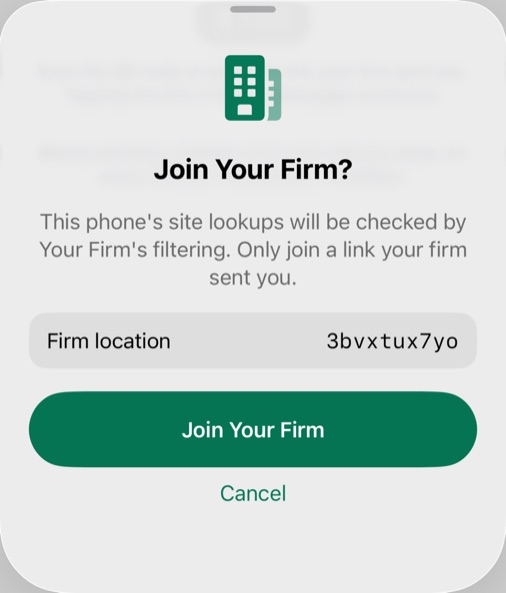
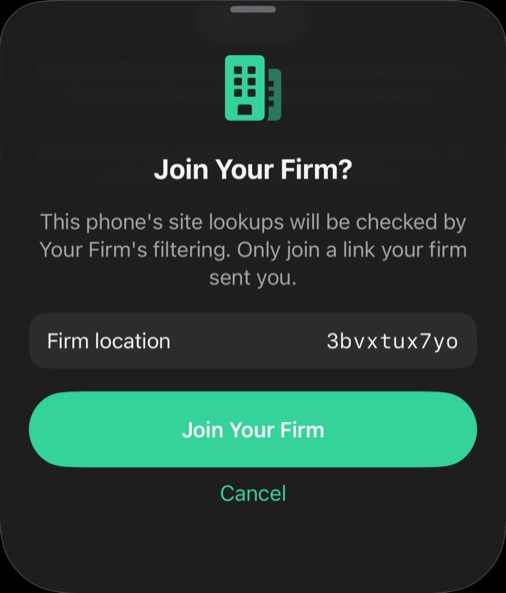
The Walltunnel iPhone app asking: Join Your Firm? This phone's site lookups will be checked by Your Firm's filtering. Only join a link your firm sent you.The Walltunnel iPhone app asking: Join Your Firm? This phone's site lookups will be checked by Your Firm's filtering. Only join a link your firm sent you.
On each iPhone Tap the firm's link. The app shows exactly who will check this phone's lookups, and asks first.
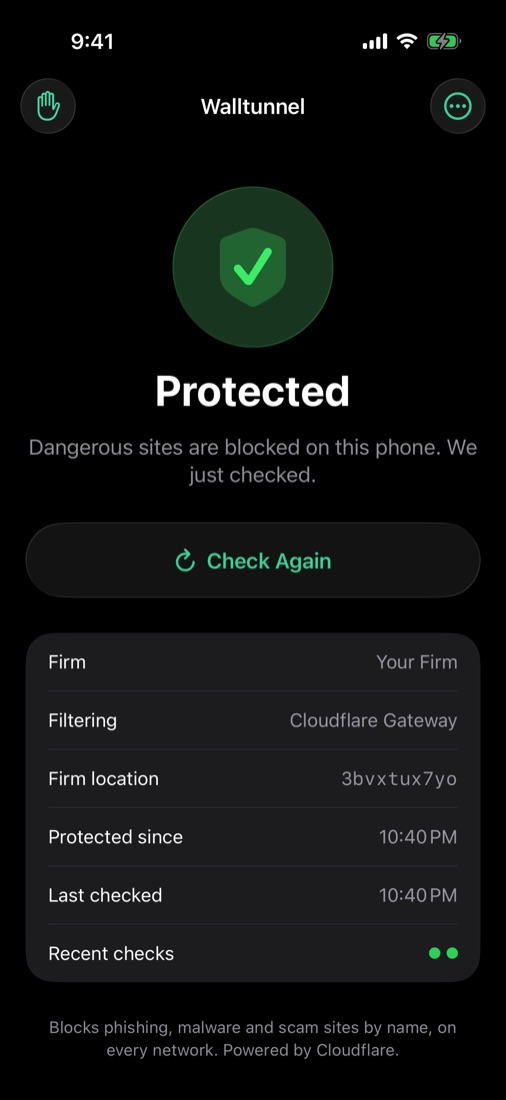
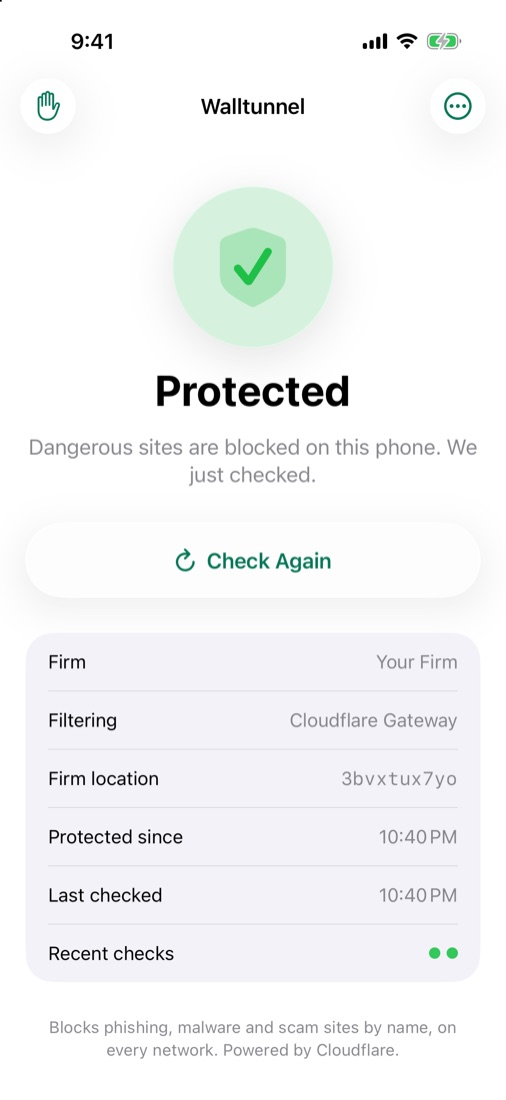
The Walltunnel iPhone app showing Protected: dangerous sites are blocked on this phone, with the firm, filtering and last check listed.The Walltunnel iPhone app showing Protected: dangerous sites are blocked on this phone, with the firm, filtering and last check listed.
And it checks itself The app tests its own filtering and says so if it ever stops.

Screens from the Walltunnel apps. "Your Firm" stands in for a client's name.

Pricing

One price. Per person, not per device.

$97 / person / month

$970 a month

  • Every Mac, Windows PC, iPhone and iPad each person uses
  • We set it up; staff double-click once
  • Full checking and encryption on Macs, bad-site blocking on iPhones and Windows PCs New
  • Help by email from the people who set it up
Book a setup call
Month to month. A lawyer with a laptop, an iPhone and an iPad is one person.

Your duty to clients

Lawyers must make reasonable efforts to keep client information from getting out. Walltunnel is one you can point to.

ABA Model Rule 1.6(c) and Formal Opinion 477R ask for reasonable, documented safeguards. Walltunnel is one of them, not all of them: the insurer page lists what it covers and what a firm still needs.


Already on AAi

If your firm already uses AAi case software, we add Walltunnel for you. Same people, same invoice.

Before you ask

Questions

Will it slow anything down?

No. The tunnel ends at the nearest Cloudflare data center, usually a few milliseconds away, and the checks happen there.

What does staff see when something is blocked?

On a Mac, a plain page: "Blocked for your protection", the reason in one sentence, and how to reach us if it looks wrong. Nothing was downloaded. On an iPhone or a Windows PC the site simply won't open.

Does it work with our bank, Zoom and Apple services?

Yes. Apps that refuse to be inspected are recognized from a list Cloudflare maintains and are passed through, while still being checked by name. Beyond Cloudflare's list, we add only a few exact hostnames.

Can staff turn it off?

On a Mac, not on their own: the switch is locked and the Mac can't be signed out of the firm. It reconnects by itself, and someone with the Mac's administrator password could still uninstall it. On a Windows PC, people without administrator rights can't change it; an administrator can. If a setting is changed, the Walltunnel service puts it back within seconds and records it in the Event Log. On an iPhone, iOS lets anyone switch a DNS setting off in Settings. Walltunnel checks itself and tells the person when that happens.

Who is Cloudflare in this?

Cloudflare runs the network and the threat intelligence. Walltunnel is the rules, the enrollment, the apps, and the people you write to. The app says "Powered by Cloudflare" because it's true.

What if Cloudflare itself has an outage?

A Mac keeps trying to reconnect and the menu-bar app shows the problem until it's fixed. For a long outage, we hold one-time codes that turn protection off on a single Mac for 30 minutes at a time. An iPhone whose filtering can't be reached can be switched off in Settings. On a Windows PC, lookups may stop working until Cloudflare is back, and an administrator can turn Walltunnel off.

Do you support Windows?

Yes, on Windows 11 (x64 and ARM64). The Windows app is new; tell us if anything looks wrong. Open Walltunnel.exe, approve the Windows prompt, and paste the firm's join link (the same link the iPhones use). Every lookup goes, encrypted, to the firm's filtering, the same way as on iPhones. A Windows service puts the settings back within seconds of a change, and covers new Wi‑Fi, docks and USB adapters. Like the iPhone, it checks site names only: full-address checks, download scanning, blocking installers and scripts from unknown sites, post-quantum encryption and device health reports (disk encryption, firewall, OS version) need a Mac. Someone with an administrator account can still turn it off or uninstall it. Hotel or café Wi‑Fi with a sign-in page may not work while it's on. Windows 11 only: not Windows 10 or Windows Server. A PC joined to an office domain is refused unless IT sets the office's names up first.

What if a site we need gets blocked by mistake?

Email us the address, or use the email link on the block page on a Mac. We check it and, if it's safe, allow it for the whole firm.

How long does setup take?

An afternoon for a typical office. Each Mac takes about a minute once the installer is open; each iPhone joins from the firm's link or QR code in about a minute, and each Windows PC from the same link pasted into Walltunnel.exe.

What do you keep?

Log lines: time, device, destination, which rule matched. Not page contents, not files, not keystrokes. They're kept for a day in one Cloudflare account run by AAi that holds every firm's logs; AAi staff can see them.

Do you open our encrypted traffic?

On a Mac, pages and files are opened at Cloudflare to check them, in memory, and passed on. Walltunnel doesn't store them. Apps on Cloudflare's list of apps that reject inspection, and Apple services, are not opened. On an iPhone or a Windows PC, only the site's name is checked.

We already have antivirus and an IT person.

Keep both. Antivirus watches the computer; Walltunnel watches the connection. Your IT person doesn't need to change anything, and can write to us with questions.

Are you SOC 2 audited?

Not yet. Readiness work is under way, and Cloudflare, which runs the network underneath, publishes its own audit reports. For your IT person or insurer, we can send a security overview, answers to a standard security questionnaire, our list of subprocessors and a draft data processing addendum.

Who makes Walltunnel?

AAi, which also builds case software used by law firms. AAi is part of Sedan Group.
Close the door before
someone walks through it.

Pick a time, or email us your firm's name and size. We reply with a few questions and a setup date.

Prefer email? hello@walltunnel.com